

Make the screen clear.
At-home neurofeedback training software that runs quietly over whatever else is already on your screen. Do what you normally do — and train your brain while you do it.
Designed by a clinician. Simple for anyone. Nothing leaves your computer.
Train your brain while you work or play.
ClearBrain is brain-training software that places a translucent overlay on your computer screen. Pick a state to practice — relaxed, focused, sharp. As your brainwave rhythms meet your training criteria, the overlay clears; as you become more distracted or tense, it dims. You receive immediate visual feedback on what your brain is doing. This is what lets you practice — or ‘train’ — finding and holding your desired mental state. The overlay is click-through, so whatever you were working on, watching, or playing continues functioning normally.
- Your computer screen is the feedback. It starts as fullscreen, or can instead be an individual window you place over part of your screen.
- Sound modulation is also a feedback option — hear a tone sound or increase and decrease the volume of a chosen app.
- There is a live training graph that you can have open while you work and train. It shows you what your brainwaves are doing in real time.
- Your training data is only stored on your computer, and you can review past sessions to see how your data compares over time.
- Pro versions unlock additional graphs and statistics on your brainwave rhythms, including frequency distribution, live waveforms, and other analysis.
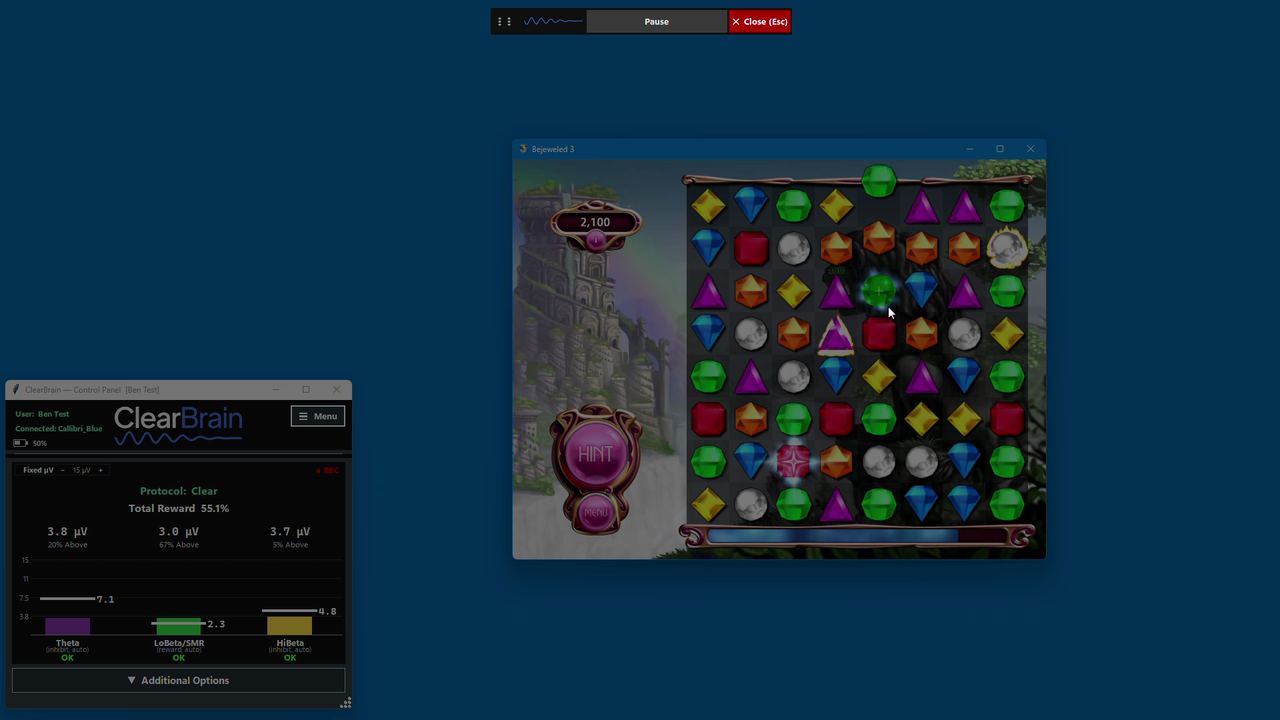
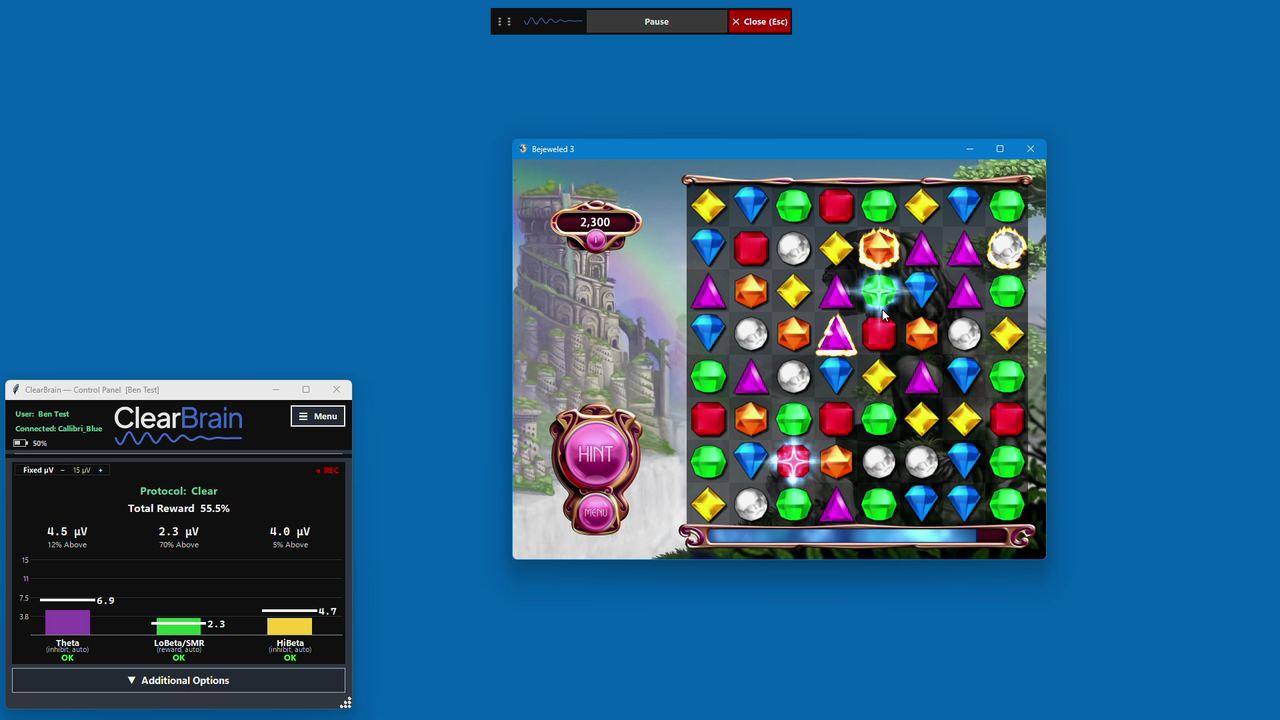
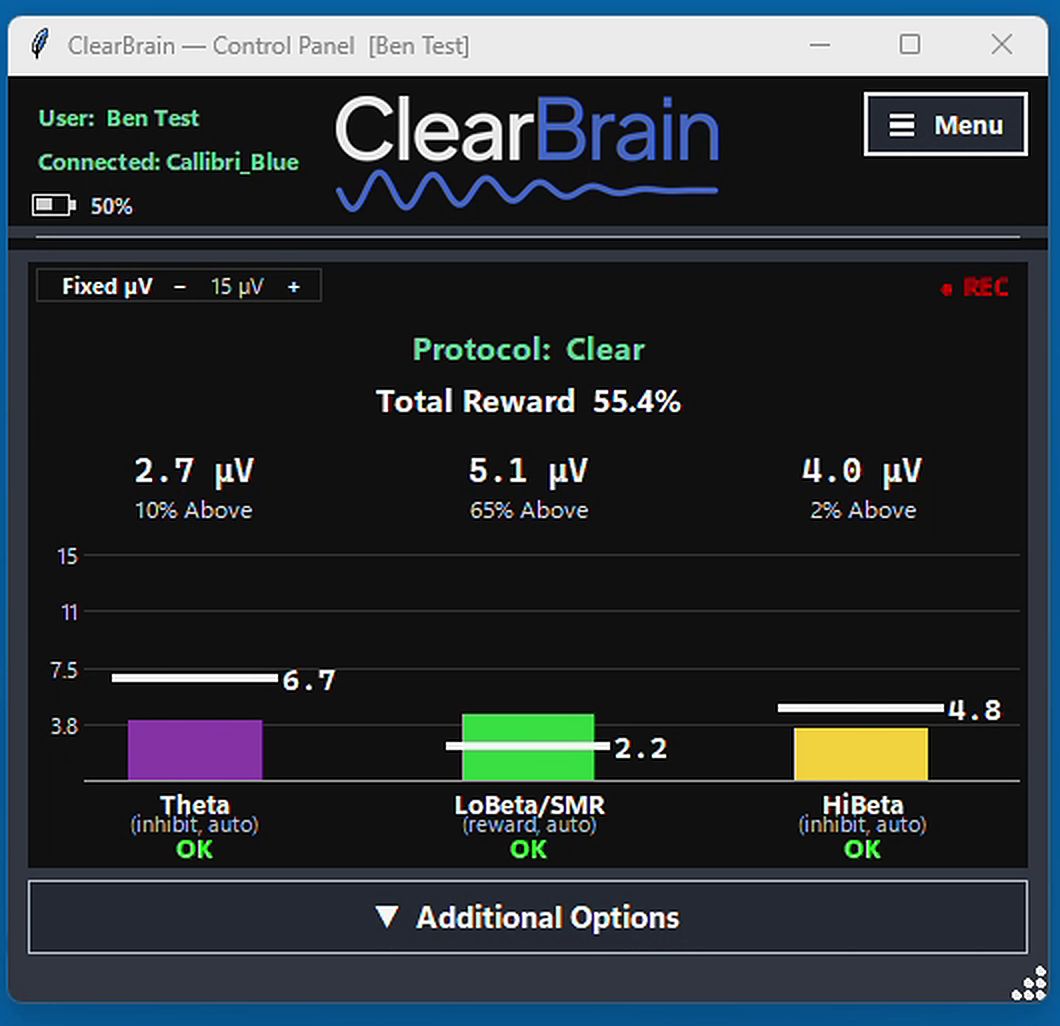
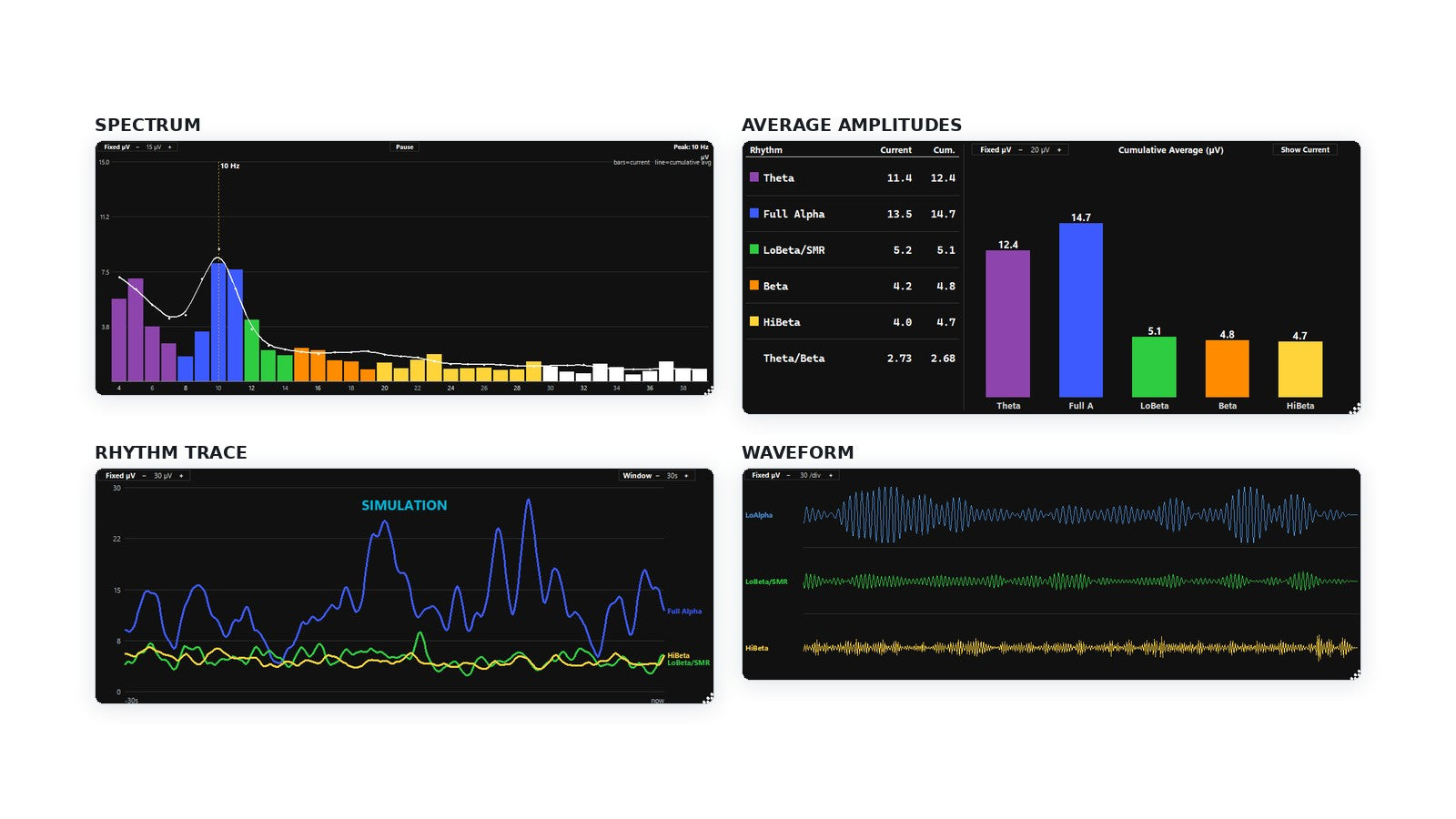
Fullscreen. The whole screen is the feedback. It dims and clears as the signal moves.Below criteria. Rhythms outside the range you are training: the screen dims.Meeting criteria. Back inside the range: the screen clears and the game underneath is fully visible.Windowed. The same feedback in a window you place over part of the screen instead of all of it.Over your work. The same window over a spreadsheet — the feedback dims and clears while you keep working.The control panel. Amplitudes in microvolts, the reward percentage, and each rhythm marked inhibit or reward.Pro displays. Spectral Display, Rhythm Trace and Waveform, running alongside the session.The four Pro displays. Spectrum, Average Amplitudes, Rhythm Trace and Waveform — each in its own window, or side by side in the Multi-Display.
What you actually do
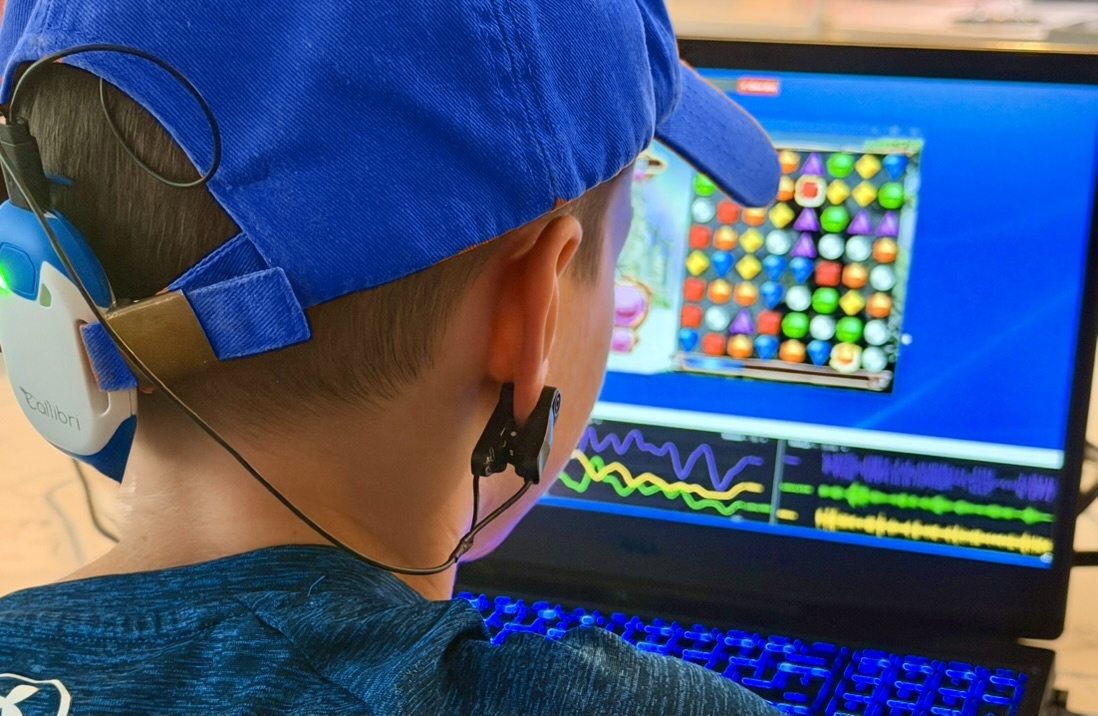
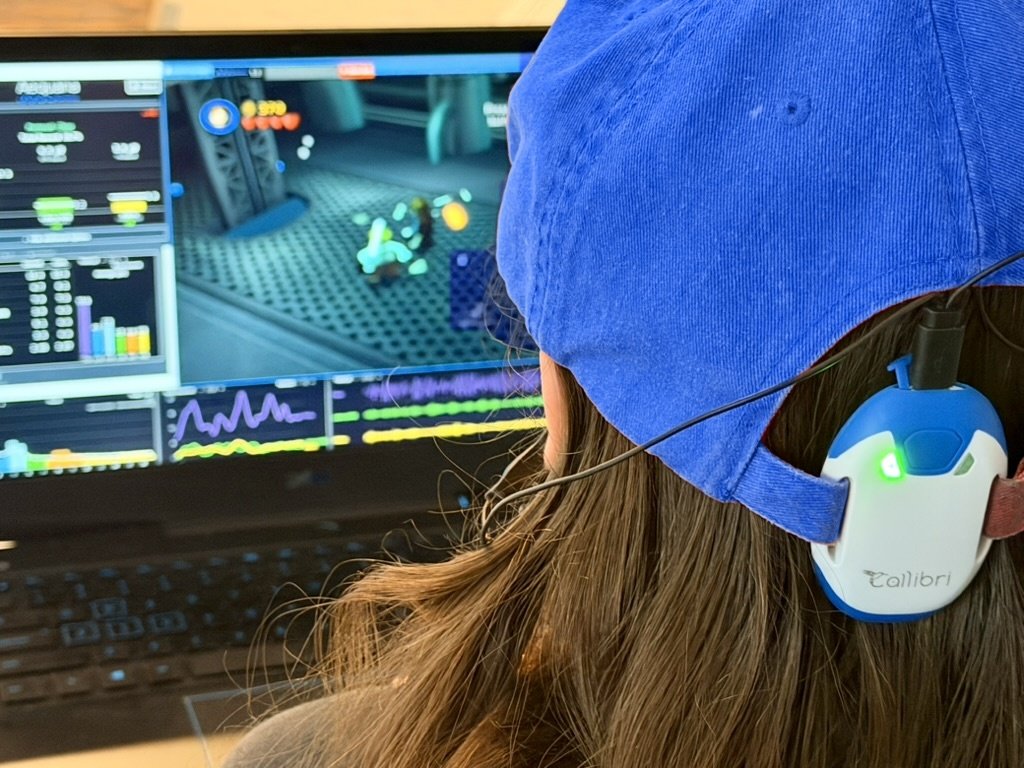
Put on a hat with a small EEG sensor clipped to it. Start a session and go back to whatever you were doing. The sensor reads your brain’s electrical activity a thousand times a second; when those rhythms meet your training criteria, the overlay on your screen clears — or the volume gets louder. When the rhythms are too high or low, the screen dims — or the volume becomes softer. That is the whole process — you practice steadying your desired mental state while using your computer normally. The screen is what trains you: it shows you, second by second, when you are not quite there, and your brain learns how to fine-tune itself.
An EEG sensor in a hat, and a Windows PC. That’s the whole setup.
No clinic visit, no laptop full of wires, no monthly anything. What arrives in the box is small enough to keep in a drawer.
The hardware
A single-channel Callibri EEG amplifier — about the size of a matchbox or a thumb drive. It reads your EEG (brainwaves) a thousand times a second and sends it over Bluetooth to your computer. The amplifier loops onto the adjustable back strap of a baseball cap — velcro, cloth or leather, youth or adult. Its cable carries a gold, dry EEG sensor that attaches to the inside of the hat, held in place with a magnet, as well as an ear clip. You place the sensor at different spots inside the hat depending on what mental state you choose to practice.
What the software does
Reads your brainwaves a thousand times a second and compares them against the training protocol that you select. Meet your training criteria and the screen clears; not quite right, and the screen shows you by slowly dimming. You get to practice getting ‘just right.’
After the session
Everything saves to your own machine. Review a session, replay it, or look at the trend across every session you have run.
What you need to start
Windows 10 or later, with Bluetooth 4.0 or newer (Low Energy). Most laptops made since 2014 qualify; a desktop without it would need a USB Bluetooth 5.0 adapter. Then the amplifier and its magnetic cable, and a baseball cap with an adjustable velcro, cloth or leather back strap. The kits include everything you need, together in one box. If you already own the correct hardware, you can simply purchase the ClearBrain software.
What a session looks like
Set the sensor, press start. Then go about doing whatever you would normally do on a computer and practice keeping the screen bright — for ten minutes or an hour. You decide how long you want to train, without having to set aside time.


Anyone can practice this. Nobody has to find the time.
Everyone knows they should meditate, or practice taking deep breaths, or sit quietly for ten minutes. Most people don’t — not out of resistance, but because practice normally means carving a half hour out of your day and then spending it wondering whether you are doing it right.
ClearBrain runs on top of the work you were already going to do, the show you want to watch, or the computer game you want to play. Nothing to schedule or set aside time for, and it shows you second by second when you’re doing it ‘right’.
Already doing neurofeedback
You’re already doing clinical neurofeedback and want to keep practicing between appointments. Run the same kind of protocol at home, export your session record and hand it to your provider.
In therapy, and want something to practice
Therapy is an hour a week. ClearBrain gives you something to practice the other six days, whenever it best suits you, with something you want to pay attention to.
Parents, for their kids
Getting your children to practice mental wellness can be even harder than doing it ourselves. With ClearBrain they can play their game, watch their show, do whatever they were going to do anyway — the training runs over the top of it. ClearBrain does not take your child’s biodata — no one does. It lives on your own computer.
Peak performance
Athletes, students, surgeons, musicians, anyone whose work asks them to stay level when the pressure arrives. Practice the state you want before you need it, rather than hoping it turns up on the day.
ClearBrain is a general wellness product. It is a way to train, not a treatment, and it is not a substitute for care from a licensed professional. If you are working with a clinician, tell them you are using it.
You choose what to reward. It shows you the actual numbers.
Most consumer neurofeedback systems hand you a “score” and ask you to trust it. But what does that score actually mean — and is it valid for me? ClearBrain shows real EEG amplitudes in microvolts, the same unit and language professionals use, built for consumers. It is not a clinical system and not a substitute for treatment — but there is a lot here that professionals will really like. ClearBrain Pro unlocks the parameters behind the preset protocols so you can program your own.
Artifact handling that actually holds
Blinks, delta surges and jaw clenching are caught and counted on every tier, and a contaminated second never gets into the baseline that sets your threshold. Pro adds control over how each detector behaves.
Easier and Harder, in one press
Two buttons move every active threshold at once, so nobody has to struggle with a predetermined template that doesn’t quite fit their brain.
Every protocol, tailoredPro
In Pro, you can edit frequency bandwidths, protocol parameters, and change the training thresholds to manual control.
Guardrails, not handcuffs
Rewarding rhythms that leave people foggy is blocked or challenged before you can do it by accident. Everything else is yours.
Features marked Pro are in ClearBrain Pro and Pro Unlimited, not Basic. Basic and Pro, compared.
Real numbers, not a wellness score.
These are the actual Pro displays, not mockups. Every figure is an amplitude in microvolts measured from your own signal. Nothing is scored against a norm, and nothing is compared against anybody else — the only benchmark is your own history.


See what you actually did.
When a session ends, Review Session shows the whole thing: each rhythm’s average in microvolts, how the trained rhythms moved second by second, and how this session sits against your own average at the same sensor site. Any session exports to a PDF you can keep or hand to someone.


No account. No cloud. And we never auto-charge you.
Nothing leaves your machine
Sessions are plain files on your own desktop. There is no server to breach, because there is no server.
No account to create
Open the app and train. Several user profiles live locally, side by side.
No card on file, ever
Annual licenses end on their date. We email you before they do, and you decide. Nothing renews behind your back.
Or buy it outright
Pro Unlimited is a one-time purchase you own indefinitely. No date on it at all.
Why the license expires instead of auto-renewing
Most consumer products with license expiration dates keep a card on file and default to auto-renew. We intentionally decided not to do that. ClearBrain’s licenses carry their own end date, checked offline by the app. We’ll send you an email reminder when the end date gets close, and you choose whether to renew your license or not.
Built and owned by a practicing clinician.
ClearBrain comes out of a working counseling and neurofeedback practice. The person who designed the software has been running clinical neurofeedback with real people for over fifteen years. Fifteen years of frustration with consumer-grade products was the inspiration for this one.
Every decision traces to a session
Battery indicator, artifact rejection, rhythm descriptors, auto and manual thresholding, a pause on the spectral display to quickly see peak alpha frequency without pausing training, and countless other features are built in because real people asked for them — practitioners, and the people sitting in the chair.
Accessible, simple, without being dumbed-down
We removed the barriers to real neurofeedback, without sacrificing quality.
Performance and everyday practice in one product
Peak-performance work and mental-health work have been drawing on the same psychophysiology for decades. We just stopped pretending they were different markets.